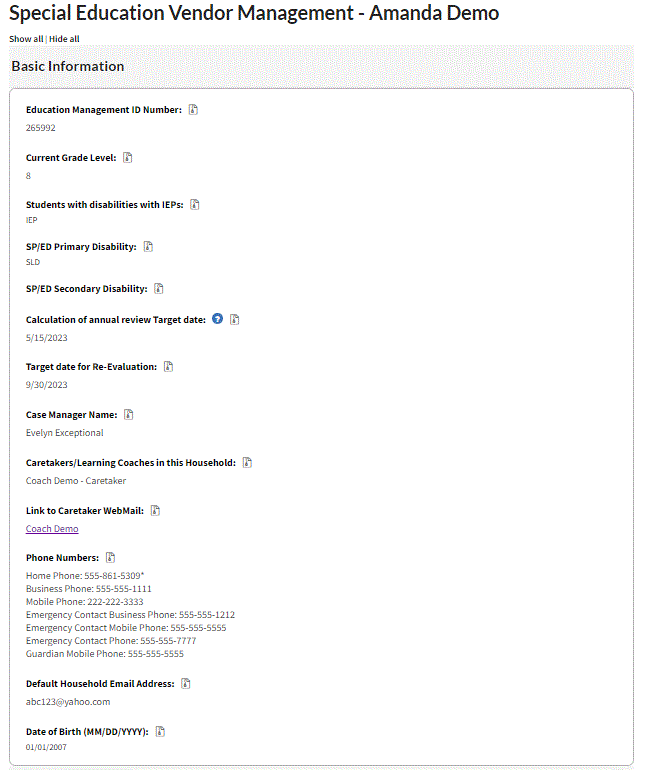
The Special Education Vendor Management Data View is designed for approved external providers. This data view allows therapists and evaluators to easily access key information about the student's services and IEP. This data view is editable, so therapist can easily make updates to service minutes, therapist assignments, start dates, and service statuses as needed. Therapists can also view copies of students’ IEP documents and evaluations reports from this data view. Any changes made within the Vendor Management Data View will be reflected in the Special Education Data View. Therapists can continue to view the Special Education Data View in "read only" mode, but they will only be able to make changes to field within the Special Education Vendor Management Data View.
How to Access the Vendor Management Data View
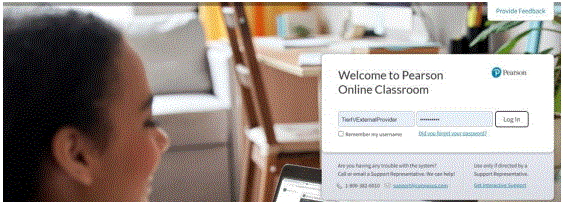
- Log into the Pearson Online Classroom.
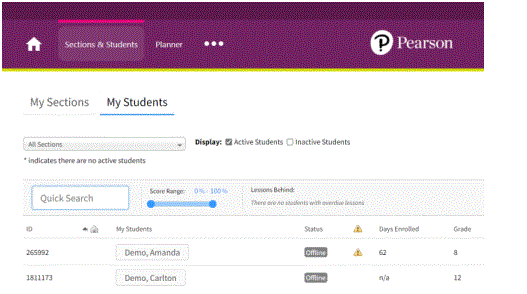
2. Select Sections & Students from the Homepage.

3. Select a student’s name.
4. Select Data View from the list of options.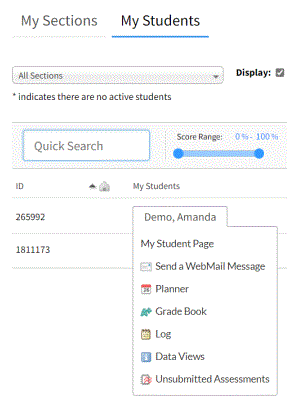
5. View the list of available data views and select Special Education Vendor Management
Data View.
You can click the star icon next to any data view if you want to make this a favorite data view which will always appear at the top of the list.

Sections of the Vendor Management Data View
Let's cover the six sections of the Vendor Management Data View. We'll dive into how to update and maintain this information in a separate article.
| Section | Purpose |
| Basic Information | This is a read-only section that pulls information about the student from other fields and data views. It contains information about the family such as their phone number, webmail link, and email address as well as information specific to the IEP such as the student's disability, annual review target date, and anticipated re-evaluation date. |
| Applied Behavior Analysis (ABA) |
Schools use the service and evaluation sections to submit referrals for ABA providers. They include information such as the setting, minutes, referral details, and preferences for vendor/provider. If an evaluation is request, the school must upload signed consent. The Operations team updates the assigned provider's ID number after they are assigned. Service start dates and minutes offered in last 30 days are automatically calculated according to entries in the student's log. If a student requires two ABA providers, such as a BCBA and RBT, one will be listed in the "ABA" section and the other will be listed in the "Other" section of this data view. |
| Counseling/Social Work | Schools fill out the Counseling/Social Work Provision DV to request referral for counseling services or evaluation. Some key fields are displayed in this section, such as the number of minutes on the IEP and setting for therapy. Operations updates the ID number after a provider is assigned. |
| Hearing |
Schools use the service and evaluation sections to submit referrals for hearing providers. They include information such as the setting, minutes, referral details, and preferences for vendor/provider. If an evaluation is request, the school must upload signed consent. The Operations team updates the assigned provider's ID number after they are assigned. Service start dates and minutes offered in last 30 days are automatically calculated according to entries in the student's log. If a student requires two hearing providers, such as a DHH teacher and an audiologist, one will be listed in the "Hearing" section and the other will be listed in the "Other" section of this data view. |
| Nursing | Schools use the service and evaluation sections to submit referrals for nursing providers. They include information such as the setting, minutes, referral details, and preferences for vendor/provider. If an evaluation is request, the school must upload signed consent. The Operations team updates the assigned provider's ID number after they are assigned. Service start dates and minutes offered in last 30 days are automatically calculated according to entries in the student's log. |
| Occupational Therapy Services | Schools submit OT referral requests using the Occupational Therapy Provision DV. This information is transferred here including the minutes, setting, and consent for evaluation. |
| Orientation & Mobility | Schools use the service and evaluation sections to submit referrals for O&M providers. They include information such as the setting, minutes, referral details, and preferences for vendor/provider. If an evaluation is request, the school must upload signed consent. The Operations team updates the assigned provider's ID number after they are assigned. Service start dates and minutes offered in last 30 days are automatically calculated according to entries in the student's log. |
| Other Related Services Not Listed | If a student has two providers for one service area, or if they require a service that does not fit one of the predefined categories, this related service or evaluation request will be listed here. Schools will use this data view to fill out referrals for other types of therapy or evaluations. This section should not be used for S/L, OT, Counseling, or Psychology referrals. |
| Physical Therapy | Schools use the service and evaluation sections to submit referrals for PT providers. They include information such as the setting, minutes, referral details, and preferences for vendor/provider. If an evaluation is request, the school must upload signed consent. The Operations team updates the assigned provider's ID number after they are assigned. Service start dates and minutes offered in last 30 days are automatically calculated according to entries in the student's log. |
| School Psychology | Schools submit psychology requests using the Psychology Provision DV. Key information such as the signed consent and other documents are listed here. |
| Speech/Language Therapy Services | Schools submit referrals for S/L therapy and evaluations using the Speech/Language Provision Data View. This information is transferred here to list setting, minutes, etc. |
| Vision | Schools use the service and evaluation sections to submit referrals for vision providers. They include information such as the setting, minutes, referral details, and preferences for vendor/provider. If an evaluation is request, the school must upload signed consent. The Operations team updates the assigned provider's ID number after they are assigned. Service start dates and minutes offered in last 30 days are automatically calculated according to entries in the student's log. |
| IEP Documentation | This section is identical to the Special Education Data View. It houses current and previous IEP documents, evaluation reports, and Section 504 documentation (if applicable). Most often this information was uploaded by the school, but you may also see older documents that were provided by parents/guardians during the enrollment process. |
Each section of the 3rd Party Referrals data view is "locked" from editing after a school submits the referral to provide the Operations team with time to process and assign the referral. If a school needs to make edits or cancel a request, they may do so using the "Change in Status" section at the bottom of the 3rd Party Referrals DV. Changes such as minutes, providers, or setting are updated by the Operations team and reflected in both the 3rd Party Referrals DV and Vendor Management DV.
Check with your school's special education leader to confirm if you will upload applicable documents (such as progress notes or evaluation reports) to the Vendor Management Data View or share via IA or webmail. You should NOT delete IEP documents from the data view.
What Type of Student Information is Found in this Data View?
Everything in the Basic Information section of this data view is pulled directly from the Special Education Data View. This is the only section of the Vendor Management Data View that is read-only because these fields are maintained by school staff. The following information can be found in Basic Information:- Educational Management ID Number (formerly known as Connexus ID Number)
- Current Grade Level
- IEP Flag
- Primary and Second Disability
- Annual Review Target Date: If this is blank, it means that the case manager has not
entered the date of the most recent annual review. - Re-Evaluation Target Date: If this is blank, it means that the case manager has not
entered the date of the most recent evaluation date. - Permission to Test documents
- Case Manager Name
- Caretakers/Learning Coaches
- Link to Caretaker Webmail
- Phone Numbers
- Date of Birth
How to Access Permission to Test Documentation
Signed consent forms are uploaded to the bottom of each evaluation section of the DV. Certain sections, such as School Psychology, include multiple upload buttons.
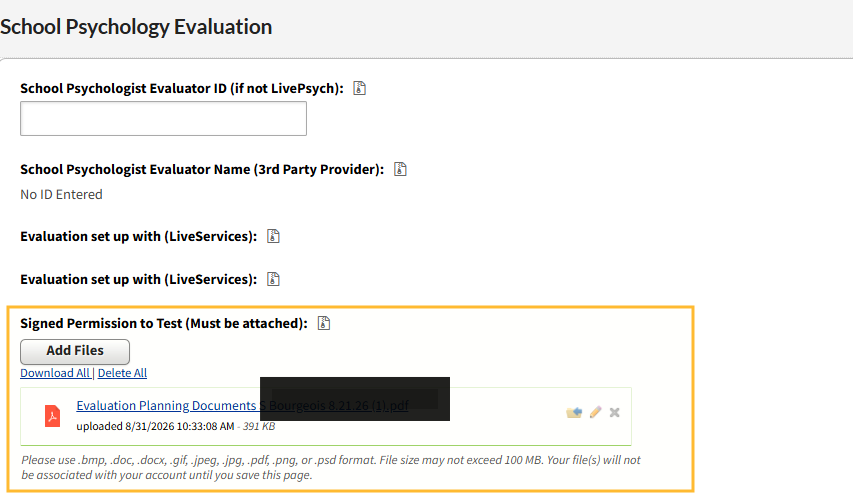
The school may also add additional documentation here:

Notice in the screenshot below that there is a webmail link for the caretaker. This is how you can easily send a webmail to the student's caretaker.