![pearsonlogo.png]](https://knowledge.pvsvendorportal.com/hs-fs/hubfs/pearsonlogo.png?height=40&name=pearsonlogo.png)
Beginning in February 2026, the Evaluations and Related Services Request Form will display options to submit referrals for third-party ESY related services. If a student has qualified for ESY services for summer 2026, please submit one form for each area of third-party related services that the student requires. This means that if a student is eligible for ESY PT and ESY ABA services, you would submit two form submissions. Similar to the current notification process, schools will receive email notifications throughout the process when a form has been submitted and when a therapist has been assigned.
For a detailed walk-through of how to fill out the form for related services referrals for ESY, please review the Scribe guide for How to Submit a Ticket for ESY Referrals.
- Fill out one entry per related services ESY area using the Evaluations and Related Services Requests Form. Please follow directions for the "details" section of each related service area and include details related to setting, duration, sessions, and time frame. For example, a PT referral for ESY could include details such as "Virtual PT ESY for 6 sessions at 60 min/session to be held between June 10 and August 15."
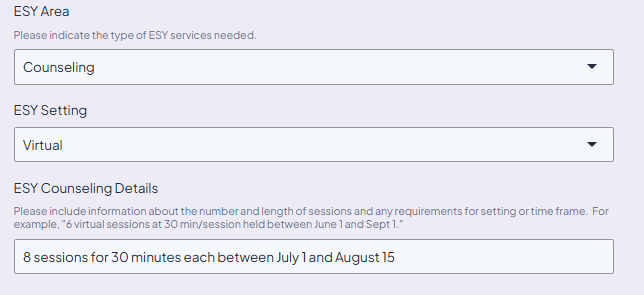
2. School receives a confirmation email that the ESY referral has been received.
3. Related Services Coordinator sends the ESY referral to an approved vendor.
4. Vendors responds in the Customer Portal with the name of the therapist who will be assigned to the ESY referral.
5. ESY therapist is assigned and ticket is closed.
6. School and vendor contacts receive an email notification of the therapist who has been assigned.
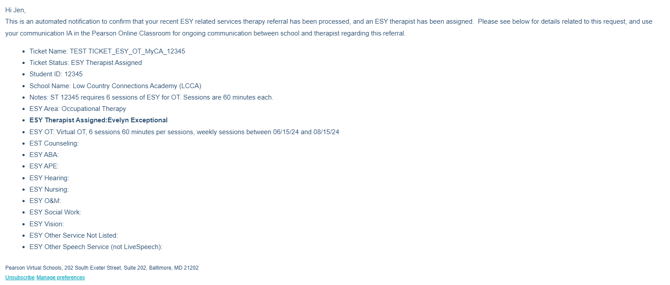
7. Students are assigned to their ESY sections in the Pearson Online Classroom after the end of the school year.
All related service ESY referrals should be submitted by April 15th to allow adequate time to assign therapists.
If your student is currently assigned to a LiveSpeech, LiveOT, or LiveCounseling provider and requires ESY for that service area, please follow LiveServices process for ESY referrals within Pearson Online Classroom. If you have a student who currently works with a virtual third-party provider for S/L, OT, or Counseling and requires for ESY, please fill out the related services referral form, and the Operations Team will import this data into POC and work with LiveServices to determine if the ESY referral can be fulfilled by an internal service provider.