![pearsonlogo.png]](https://knowledge.pvsvendorportal.com/hs-fs/hubfs/pearsonlogo.png?height=40&name=pearsonlogo.png)
Tier IV Users (therapists) are not able to access the Student Overview (User Overview) page in POC. If you are accustomed to using this page to access your students, you will need to go to My Students and then use the dropdown menu next to each student to open their pages. If attempting to go directly to a Student Overview, you will receive an "access denied" message.
Tier IV Users (Therapists)
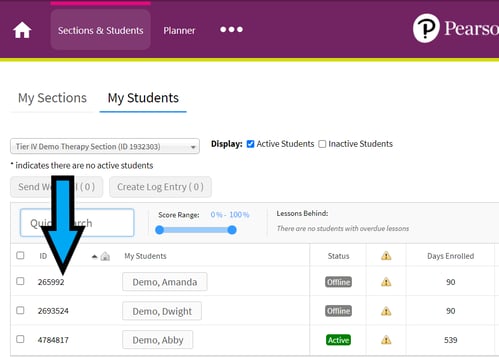
If you are a Tier IV user, which is the role typically assigned to therapists, you can find your students' ID numbers by accessing Sections & Students and viewing your list of students. Their ID numbers are listed next to their names as seen in the screenshot below.
Tier V Users
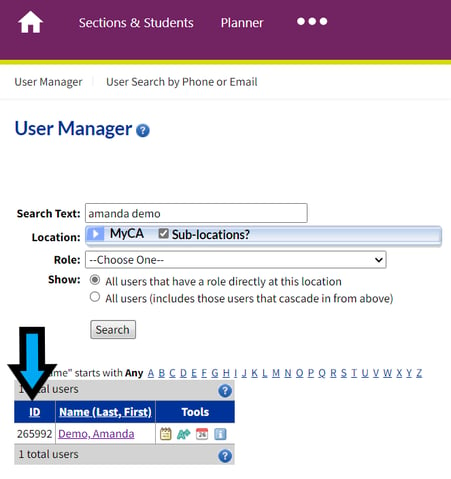
If you are a Tier V user, which is the role typically assigned to school psychologists, you can find your students' ID numbers by searching for the in the User Manager. Their ID numbers are listed next to their names in the screenshot below.